N Scale Fixed Coupling Drawbar Update

This week I have another product update to share with you.  Unlike last week’s update, for the Minitrix eccentric rod crankpin, which was driven by improving the part, this time it’s simply about reducing the cost to you.

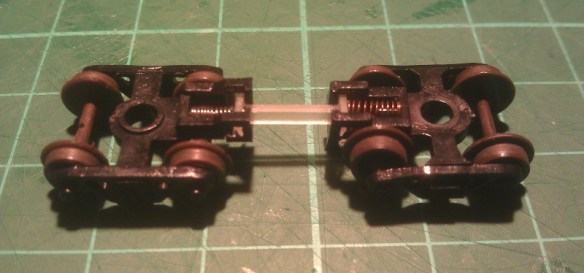
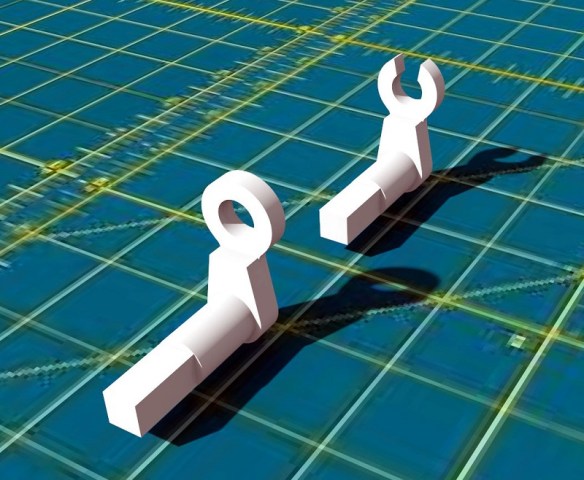
For many years I’ve offered N scale and N Gauge fixed link couplings or drawbars to use between rolling stock or, as I like to use them, between multiple diesels that stay coupled together.  This is really useful if you install a DCC decoder in one locomotive which drives both motors, you can read more about that here.  These drawbars are designed to fit into the Rapido style coupling pockets as you can see below.

To start with these couplings were offered in Shapeways FD (Frosted Detail) material but as that was removed from the available materials they automatically became available in FUD (Frosted Ultra Detail) and sadly the cost went up a bit.  When Shapeways restructured their material pricing again back in June of 2017 these became rather expensive.  However, just as with the Minitrix crank pins from last week I’ve combined the fixed links or drawbars into one piece making them much cheaper to order, as you can see below.

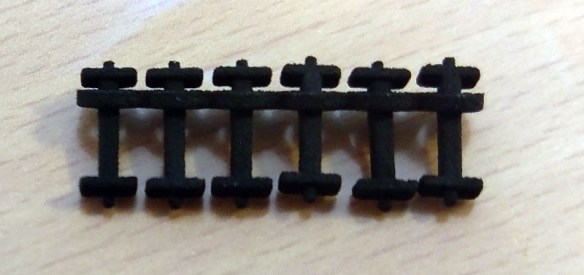
And I’ve also made the primary material BNVP (Black Natural Versatile Plastic) formally known as Black Strong & Flexible.  This is one of the cheaper materials; it’s already a good color for a coupling and can be used right out of the box.  Below you can see a set I’ve already ordered.

These are available in a variety of lengths and all come in packs of 6:

4mm
5mm
6mm
6.5mm
7mm
8mm
9mm
10mm
11mm
12mm
13mm

And if you’re not sure which lengths you need I do have two sample packs available:

Basic Sample Set – Containing 4mm, 5mm, 6mm, 6.5mm, 7mm, 8mm & 9mm.

Full Sample Set – Containing 4mm, 5mm, 6mm, 6.5mm, 7mm, 8mm, 9mm, 10mm, 11mm, 12mm & 13mm.

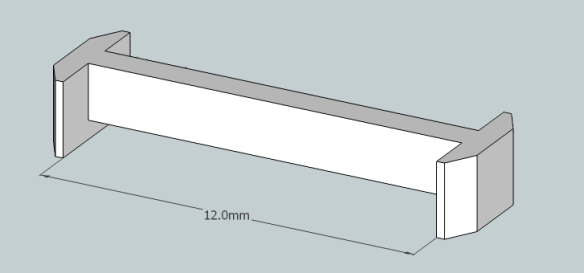
The length refers to the distance from the inside of the coupling pocket, for instance the 12mm is measured like this:

Next week I’ll have some real steam to share with you as I spent a day at ‘The Great Dorset Steam Fair 2018’.

N Scale Minitrx Eccentric Rod Crank Pin Replacement Update

This week I have an update to share with you regarding my N Scale Minitrix eccentric rod crank pin replacements.

Back in September of 2015 I wrote a post about repairing Minitrix steam engines which had suffered with broken eccentric crank pins.  You can find the post here.  These fit A3, A4, 7P (Britannia), 9F, US K4 and US 2-10-0 Decopod steam locomotives.

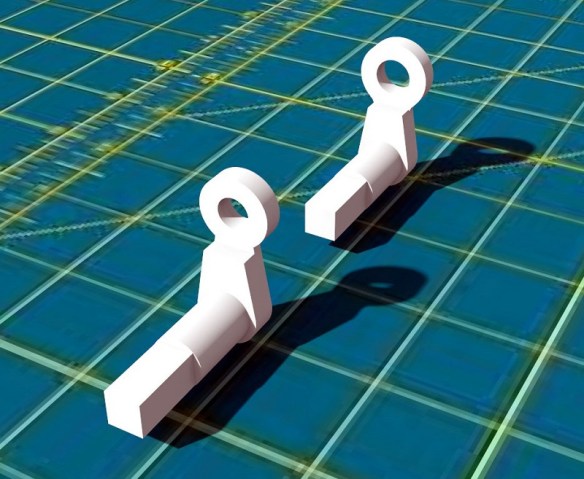
The crank pin, as illustrated below, has a square peg which fits into the actual wheel and a hole which receives a steel rivet linking it to the eccentric rod.

Although these worked and allowed the repair of the locomotive they did have a few issues.  Their small size made them rather delicate and it was easy to break one when attempting to refit the rivet.  So I originally offered spares in each pack as it was almost certain to happen on your first attempt.

This lead me to improve them by slightly increasing the size of the loop and the size of the rivet hole as shown below, the newer Mk2 pin is at the back.

This did help and made it much easier to reinstall the rivet.  But the issue of re-flaring the rivet was still a problem and I was finding it hard to do as I couldn’t get a supply of new rivets.  This lead me to start cutting part of the loop away to leave a ‘C’ shape which could be forced over the rivet.  As it is a ‘C’ shape it would not fall back off the rivet and the rivet didn’t need to be un-flared in the first place.  The original peg, what was left of it, could be cut away and the new one could simply be clipped in.

But it was hard to cut the hoop in just the right place without braking the hoop.  This lead me to upgrade the model again to include three Mk2 parts with a complete hoop and three Mk3 parts with a ‘C’.  Below you can see the Mk2 and Mk3 crank pins.  Supplying both, I thought, would give you the option as I was unsure as to how well the Mk3 ‘C’ type would work .

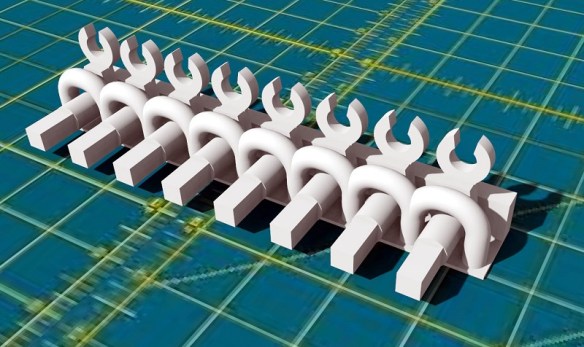
Then in June 2017 when Shapeways restructured their pricing system this model became rather expensive as each individual part had an additional $1 handling charge added to the cost.  But the answer is my new Mk4 version of the crank pin which you can see below.

The crank pins are now supplied in a frame.  Although they are not attached to the frame they are 3D printed in the configuration shown above and the loops prevent the cranks from falling out.  The whole model is therefore treated as one piece.

There are eight cranks in each model, allowing for spares, and all have the ‘C’ shaped end which I’ve now used successfully on every loco I’ve repaired since printing the first ‘C’ shaped crank.  Also having spoken to several of my customers they confirmed they didn’t use the cranks with the full hoop at all.

And as the cranks are now held together it makes them easier to not lose!  When you need one simply cut the restraining hoop.

The new Mk4 crank pins can be found here.

Next week I’ll have an update on some of my 3D printed couplings.

Alco C-855 R-T-R Build – Part 3.5 – Chassis Prep Extra

This week I have an extra post to slip into my step-by-step build of an N Scale A-B-A Ready-To-Run set of Alco C-855 locomotives.  Back in July I posted part 3 which covered the chassis preparation procedure, you can find it here.  However I missed something so in this post I’ll cover what it was and how to do it.  My apologies to anybody who has been following this build along with me.  I will update part 3 which will make this post redundant but for now here it is.

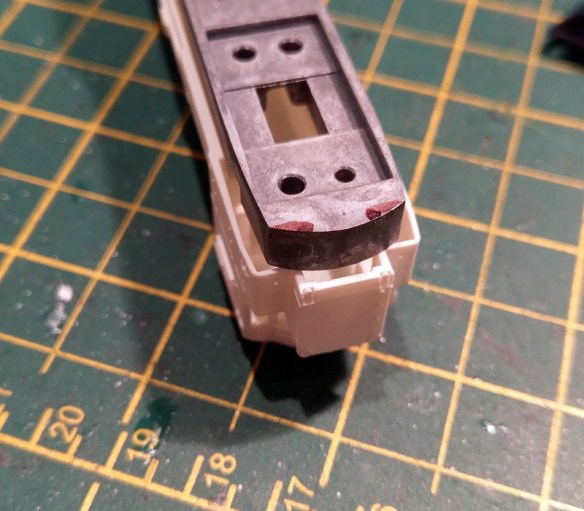
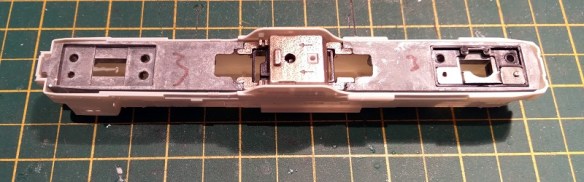
You may have noticed I regularly recommend test fitting things as you go and I should take my own advice.  The chassis below has been prepped to fit into a C-855 A unit and at the cab end you can see how the top chassis section has been notched to fit into the narrow nose.

But the lower section doesn’t fit all the way in and a test fit before I assembled the chassis would have told me that.  In the picture below I’ve removed the lower chassis section and placed it into the shell.  As you can see the inside corners of the nose clip the shell.

However this is easily fixed by cutting two notches in the chassis section as marked below.  Each notch is 3.5mm (0.1377“) wide by 2mm (0.0787“) deep leaving a nose of about 6mm (0.2362″) wide.

I cut these out using my Dremel tool and cutting disc.

The bottom chassis section now fits into the shell.

This extra notching is not required for the C-855B chassis as it doesn’t have a nose.  Next, as I have disassembled and resembled the chassis, I’ll test them for running smoothness and any binding in the drive shafts. Then it’s on to the shells which will be in a later post.

Alco C-855 R-T-R Build – Part 5 – Fitting DCC Decoders

This week’s post will be a continuation of my step-by-step build of an N Scale A-B-A ready-to-run set of Alco C-855 locomotives.  And this post will be concentrating on fitting DCC decoders to the modified chassis.  You can find part one of the build here.

Although this post is aimed at DCC installation the first part is also relevant to DC operators.

The chassis, as you can see below, is held together by vertical bolts which clamp the top and bottom sections together.  But the bolts also do more than that.  Instead of a nut on the bottom the bolts screw into the plates which hold in the trucks, and in turn convey the power into the chassis.  The bolts nearest the front of the picture and on the left hand side of the locomotive connect the left power pickup to the top chassis section.  The bolts furthest away and on the right hand side are isolated in plastic sleeves and connect the right power pick up to the lower chassis section.

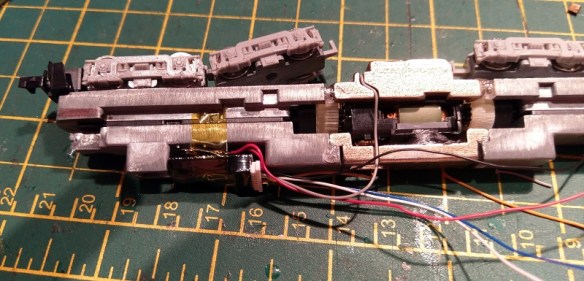
When these models were new they had a grain-of-wheat bulb connected to the front bolts which was used for the headlight, and illuminated the cab!  But we can now use these as power connections for the DCC decoder.  The original bulb had a diode attached so it wouldn’t operate in reverse.  Con Cor soldered the bulb wire to a tab plate under the bolt head and twisted the stiff diode wire under the other.  As I want to ensure good contact between the chassis and decoder I’ve made another solder tab for the other bolt as can see below.   I made it from an old axle wiper taken from a scrapped locomotive.  The decoder, also shown below, is an N scale sized chip from Gaugemaster but any DCC decoder will work as long as it fits.

Now, before we start with the decoder some electrical bridges need to be added.  This is the part which also needs to be done for DC operation.  In the picture below you can see I’ve linked the two right hand side bots together as well as the left.  This is because where the chassis has been cut and extended the new glued joints can form an isolating barrier.  So if the decoder was simply connected to the two front bolts it wouldn’t receive any power from the rear truck.

The center sections will also be isolated and as the motor used to collect power by having the contact simply touching the chassis, it’ll no longer work.  So the motor wires I’m about to install for DCC will also need to be connected for DC but just back to the solder tabs.

For the DCC decoder the red and black wires are cut short and soldered directly to the solder tabs. They should now be linked to both sets of trucks.

The chip can then be folded in and secured with Kapton tape.  Kapton tape is ideal as it’s isolating, thin, strong and designed to withstand heat in electrical situations.

The gray wire is the bottom motor feed and runs outside the chassis and is soldered onto the bottom motor tab.

There is a wire channel printed into the chassis extension for this wire as you can see below.  This wire, once fitted can be covered in a piece of Kapton tape or glued in.

The orange wire runs halfway down the other side and connects to the top motor tab. It could go through the hole in the top but I like to do it this way.  The blue and white wire are for the headlight so stay at the front.  If you wanted to add a rear light the yellow and another blue would need to be run to the back but as these will run in an A-B-A consist the rear light is not necessary.  With all the wires connected, except for the head light wires which I’m going to cover in a later post, they can now be fixed down.

Again I used Kapton tape to hold the wires down.  It’s important to position the wires in the middle of the chassis as they run from one end to the other as the shell has feet which sit on top of the chassis.  But there’s a gap in the middle of the foot to allow the wires to pass.  The two strips of Kapton tape are where the feet sit.

The chassis is now ready for DCC testing.

The next step is to fit the shell and for that I have to finish painting it which I’ll cover in a later post.


Peco’s New Unifrog Turnouts

In this week’s post I’m going to share with you one of the new products made by Peco, not only because I think the new product is worth a mention but also because there’s been lots of debate as to whether this new product is an improvement on the existing range as Peco will be replacing the others with this one.

Over the years Peco have made very reliable track work and I know it’s used all over the world. For example I know a museum layout in California which uses hand laid track on the public side and Peco in the hidden yards, simply because it works so well.  On our modular club layout, ‘Solent Summit’, Peco is our standard.

Peco have offered turnouts or points in two varieties in most scales for a long time,   Electrofrog and Insulfrogs; I’ve written posts before which help explain what the difference is.  The first was on how I improve my Electrofrog points for DCC operation which you can find here.  And the other was how I improve Kato points and that can be found here.  But the basic difference is Insulfrogs have a plastic frog which is the area where the rails cross, and also provide power routing. The post about the Kato points explains what power routing is.  Electofrogs have an all metal frog which improves power pickup but needs to be isolated from the other rails to prevent shorting.  This is normally done with plastic rail joiners or cutting the track with a disc cutter.

This means that Peco has two versions of every point, which makes production twice as expensive, and takes up twice as much room in the shops.  However there’s a big divide between modelers with both types being prefered for different reasons. The primary issue, I believe, stems from the age of the design which was originally built around DC operation.  DC operators like them as they are, DCC operators want them to change.  However DCC is fastly becoming more common and as I mentioned above I feel it necessary to always improve the turnouts for DCC operations.

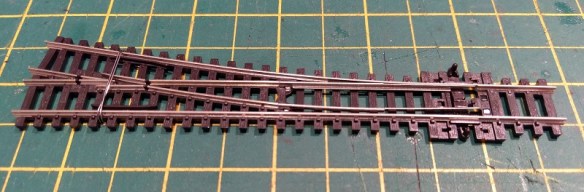
So to resolve this Peco have combined the two types and now produce the Unifrog turnout.

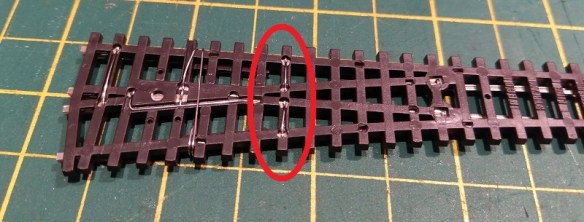
The Unifrog has a metal frog, as the with the Electrofrog, but it is isolated at both ends by plastic strips.  The wire wrapped around the point is the optional frog feed, I didn’t unwrap it as this turnout is new and only borrowed for the post.

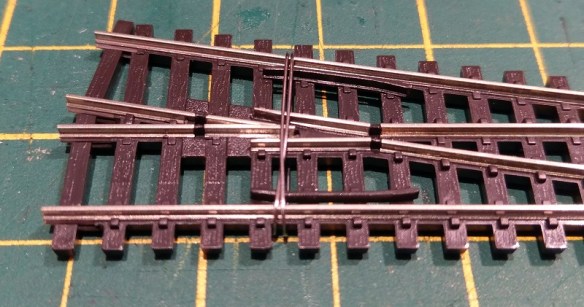
Up close you can see the isolators.  The wire, when unwrapped, is connected to the V section of the frog as well as the two check rails; this prevents any shorting from wide tread wheels which may touch both.

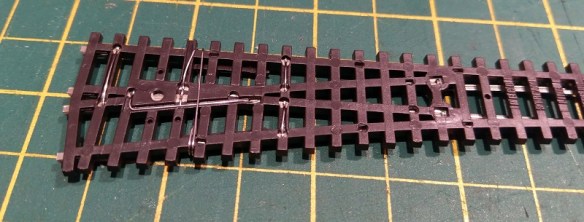
On the reverse side you can see Peco have also bridged the stock rails with the blades.  This is the main improvement I made to my Electrofrog points.  There is also a bridging wire connecting the blades with the outgoing rails next to the frog.  This means that power runs through the turnout in both directions without passing through the blade/stock rail joint irrelevant to the which way it’s set.  Perfect for DCC.

So what advantages does this give me?

  • This turnout is ready to use for DCC or DC right out of the packet.
  • I no longer need to use plastic isolating rail joiners on the two rails next to the frog.
  • There is no danger of relying on power being transfer through the blade where they touch the stock rail.
  • Compared to Insulfrog there is a large metal frog so no dead power section which affect small locos. (providing the frog has been separately powered)

What disadvantages does this give me?

  • The turnout does not provide power routing compared to an Insulfrog point for DC operation.
  • The frog will always be dead unless powered separately.

But, and this is the clever part, in order to make this work in just the same way as an Insulfrog turnout all you need to do is remove the bridges circled in red below.  This can be done with a screwdriver by braking the solder joint or cutting with snips.

Although this is not a modification I need to make, being all DCC, I think it’s a lot easier than the soldering modification to add them in. Yes, anybody wanting power routing now has an extra job to do, but it really is 30 seconds as opposed to the work required before.  This means, in my opinion, despite the compromise for the DC operators wanting power routing, the new points are a good replacement for both.

The dead frog disadvantage, also in my opinion, isn’t really a problem.  This is because for DCC operation it’s recommended to power the frog from a switch or electric frog juicer anyway.  And DC operators now have the option to power the frog which you didn’t with the Insulfrog which has to be an improvement.

Personally I thing this move by Peco is a good one and I’ll be using their new Unifrog turnouts on all my upcoming projects.

Alco C-855 R-T-R Build – Part 4 – Chassis Assembly

This week’s post will be a continuation of my step-by-step build of an N Scale A-B-A Ready-To-Run set of Alco C-855 locomotives.  And this post will be concentrating on assembling the chassis.  You can find part one of the build here.

Now the chassis sections have been extended it’s time to reassemble all the parts.  And for this build I’m also going to upgrade all the motors to newer Kato drives.  In the picture below you can see all the original parts plus the new Kato motor in the top left-hand side.

For this post I’m going to assemble the second chassis which you may remember from last week is for the B unit but the process is exactly the same for all three locos.  To start with I add the black plastic isolators into the pockets on the underside of the lower chassis section followed by the metal truck fixing.  Both are held in place by a countersunk screw, the shortest ones, which only pass through the lower chassis section.
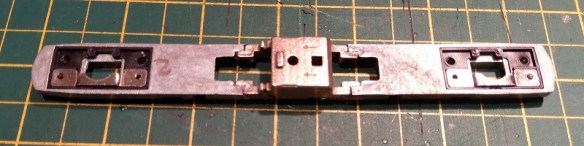
Next, and this in an important one not to miss, the first new 3D printed part needs to be added.  It’s the small square screw fixing which holds on the fuel tank.  In the original the lower chassis has a threaded hole to receive the screw but as this section has been replaced by the stainless steel chassis extender a new fixing is required.  Threading the hole would require more work and it’s much easier to drop in this plastic part.

The square part simply presses into the square hole.

It will stay in place by friction and once the motor is fitted it can’t fall out.

The motor sits in a plastic cradle; this is to isolate it from the metal chassis.

The cradle has a peg on the bottom which fits into the hole in the chassis to ensure it’s in the right way around.
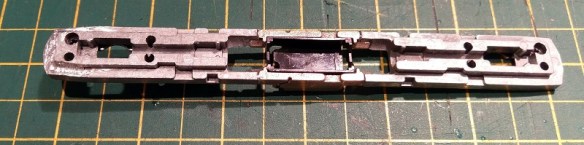
Next comes the motor.  Although I’ll cover this here I’ve written about this procedure before in a bit more depth which you can find here.  The new Kato motor doesn’t come with any gears on the drive shafts so the original ones will need to be removed from the old motor.

This is actually fairly easy to do.  I use a pair of needle nose tweezers, simply grip the shaft behind the gear and push it off.  Just don’t do it too fast or the gear will ping off behind the work bench!
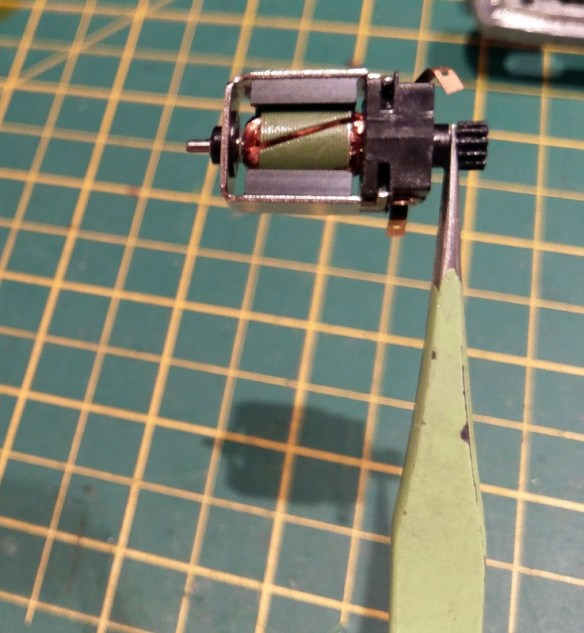
To fit the gears to the new motor simply press them on with your fingers.  They want to go on so far that the shaft pokes out the other side but make sure the gears are not tight to the motor body and the motor can spin freely.

The next 3D printed parts are the drive shaft extenders.  These are toothed parts which fit inside the existing cup gears making them longer.

I used to glue these in but as my fellow modeller Mike Musick pointed out, they work better when left free with a bit of movement.  You can read Mike’s views on this here.

Also, as you may remember from last week’s post, Con Cor have over the years made a few changes to their chassis and one of those changes was to this cup gear.  The very first design had a different number of teeth in the cup.  This means the extender won’t fit.  But don’t panic, firstly these early chassis are now getting rather rare but if you are using one for you C-855 build you can get drive shaft extenders which will fit here.

The motor is now ready to be added into the chassis.  But first it’s very important to make sure the new drive shafts spin freely without any rubbing on the chassis. Across all the Con Cor chassis I’ve converted I’ve noticed that the drive shaft length varies; I have no idea why.  I’ve supplied the drive shaft extender for the more common shorter lengths I’ve come across.  This does mean that if you have longer ones the drive shaft will now bind against the chassis extender.  To overcome this pop the drive shaft back out and file down the 3D printed part on the cup side.  Running the part up and down a file will do this.  But be sure to make the reduction even.  I would also recommend doing a bit at a time and test fitting as you go as you don’t want to make them too short.  If you do you can get more here.  Once everything is good this would be a good time to add a tiny amount of light oil to each bearing, just a drop.

There may also be one more issue to resolve if you’re using the latest Rail Barron version of the chassis.  Con Cor updated the motor casing and added the curved notches you can see in the picture below.  And therefore added some material into the motor cradle so it’s a nice tight fit.  But this means the Kato motor won’t fit!  It fits fine in all the others.
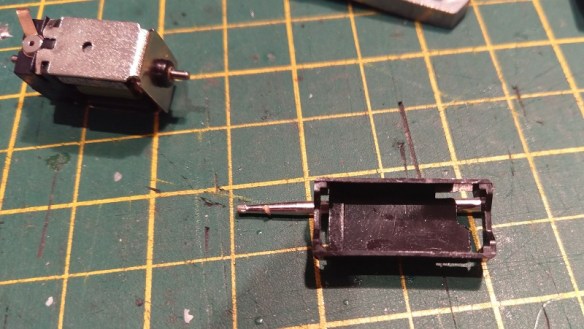
These extra plastic parts need to be removed to get the new Kato motor in and I find the best way to do it is with a with a small burr bit in a Dremmel style tool.

All four corners will need to be removed to allow the new motor to fit.
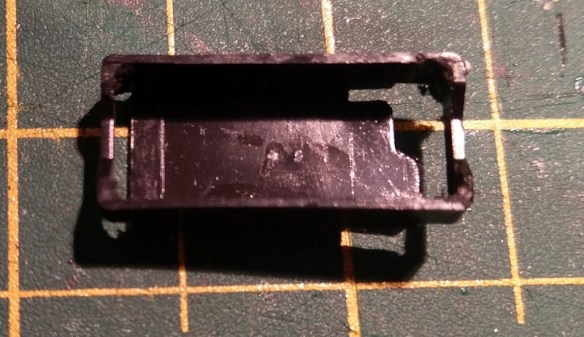
Also, and this apples to all the cradles, a shim needs to be added to the base of the cradle as the new Kato motor is slightly shorter than the Con Cor one.  Before you glue the shim in a test fit is required because if it’s too thick it will create uplift on the cup gears which will be noisy and wear out the motor.

The motor fits in to the cradle with the motor contacts at the end with the larger hole.

You’ll need to lift the drive shafts in order to fit the motor in.

Once fitted and you’re happy that everything spins freely, and the motor turns both drive shafts, it’s time to add the rest of the chassis.  There are two plastic separators which also hold down the drive shafts, these get fitted next.

Then the top section of the chassis can be fitted and the other screws fitted between the top section and the metal truck fixing. The longest screws with a plastic insulator are used on the right hand side.  The medium screws are used on the left without insulators.

With the trucks installed the extended chassis should look like this.

At this point, using wires from a DC controller, I do a basic test to make sure everything runs well.  If it’s noisy, won’t run, or sounds like it’s struggling, STOP,  there are a few things to check.

  • Can you easily turn the motor with your finger?
  • Are the drive shafts seated properly?
  • Check the drive shafts are not too long and binding on the chassis.
  • Check the gears on the motor have been pushed on far enough but not too far.
  • Is the shim under the motor too thick forcing the gears up into the cup gears?
  • Are the gear towers in the trucks jammed?

Hopefully everything runs okay with all the checks done and any issues corrected.

The next step is to wire up the chassis, I will be doing this for DCC but I’ll cover DC as well and it will all be in the next post on this project.