Removing Acrylic paint From 3D Printed Models

Last week I was asked by a customer if it was possible to remove or strip acrylic paint from a 3D printed model.  Knowing that some 3D printed plastics can be sensitive to chemicals this was not something that I had attempted but decided it was time I found out.  In this post I will share with you what works.

You may be wondering why you would want to strip the paint?  Well, there are several reasons but two of the most common are splattering caused by blockages in an air brush and paint being too thickly applied.  Both can ruin the finish of a model.

With injection molded parts the paint can be removed with 91% alcohol or certain paint thinners.  However even some of the stronger ones can remove detail from plastic parts.  With 3D printed parts, particularly stuff printed in Shapeways’ Frosted Detail materials, these chemicals can have a disastrous effect as they react with the material causing it to melt or break up.

After doing some research I found a product called Dettol here in the UK which can safely be used to strip acrylic paint.  Dettol, as pictured below, is a low price cleaner and disinfectant which can be watered down for cleaning tiled floors and work surfaces as well as cleaning minor cuts.

Dettol Paint Remover 7The primary chemical is chloroxylenol (C8H9ClO); the rest is pine oil, isopropanol, castor oil, soap and water.

In order to test this product I need something 3D printed which had been painted, and something that I would not be upset about if it turned in to a blob of plastic and paint.  For over a year I have had one of my Yosemite Valley Railroad Log Cars sat on the work bench in a half-painted state.  This car had been dropped and some of the detail parts had broken off so it was not high on my priority list.  As you can see below it had received a total covering of the primary paint.  The paint was an acrylic made by Revell.

Dettol Paint Remover 2

Dettol Paint Remover 1

As this is only a small model I found a small jar, filled it with Dettol and popped the car in.

Dettol Paint Remover 8

Having read all sorts of suggestions about how long to leave the model in the Dettol I decided to be on the cautious side and only left it for two hours.  I removed the car and already the paint was coming off on my fingers.  I ran the model under the tap and gently rubbed the flat areas with my fingers and they almost went back to white.

Dettol Paint Remover 11

For the underside with all the lumps and bumps I used a tooth-brush to gently scrub and this worked a treat.

Dettol Paint Remover 10

At this point I stopped. I could have removed every last bit but I was simply trying to find a method that works.  There is a drawback to doing this.  The Dettol does have a temporary effect on the 3D printed parts.  The car went very soft and pliable; it was very similar to when I heated this material with hot water to remove a bow. You can read more about that here.  This softening did not last and once the part had dried it began to stiffen again.  I don’t believe that it will remove any of the detail from the parts but if handled roughly in this pliable state the parts can easily be broken or torn if they are particularly thin.  I left the car overnight and the next day it was back to being a hard model and was ready to receive paint, although there was a smell that took me back to falling over in the playground!

So if you reach the stage with your 3D printed model that there is nothing you can do to cover a bad paint job all is not lost and you don’t have to order a new shell.  However I would still advise caution before dipping all your models in baths of Dettol; make sure you have a set down area ready for when the parts come out to reduce the risk of damage and avoid keeping the parts submerged any longer than necessary.

On another note should you wish to buy another 3D printed model, or even order your first 3D printed model, Shapeways are offering free shipping on any order untill the 12th of July 2015. Simply add your items to the cart and the free shipping discount is applied.
Cleaning Up 3D Printed Models

This week’s post will be a short one as my wife has got us tickets to see the new Hobbit movie, so I am off to the cinema, but I promise I won’t give any spoilers!  Last week I shared with you my new 3D printed O Scale UP water tenders for the excursion train, you can find the post here.  So this week I will share some of the work I am doing on the tenders, starting with cleaning them up.

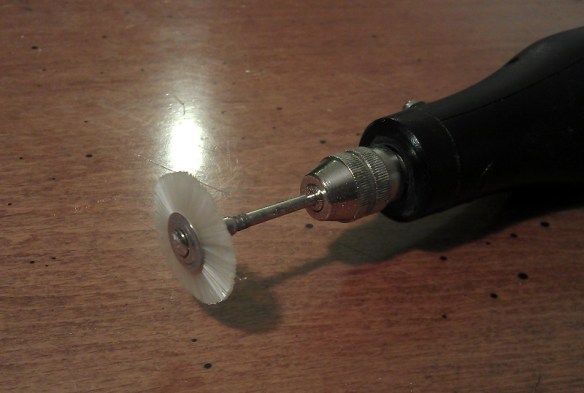
The tenders have been printed in Shapeways’ Frosted Detail material. Models printed FD or FUD (Frosted Ultra Detail) have a waxy residue and need to be soaked in Bestine, Goo Gone or somthing similar. This leaves a powder on the surface which is the dried up wax residue.  I have also found that models in FD have more powder than models in FUD.  To remove the powder on my N Scale models I normally use a soft toothbrush and gently scrub the model.  This does not always remove it all, particularly from the difficult-to-reach areas.  To get over this I have a soft brush that fits onto my mini drill, similar to a Dremel tool. Mini Drill - Soft Brush With the large surface area of the O scale tenders this made the job much faster and helped me get into all the tricky areas such as around the grab-rail posts.  These can be delicate and the toothbrush has an increased possibility of knocking them off.

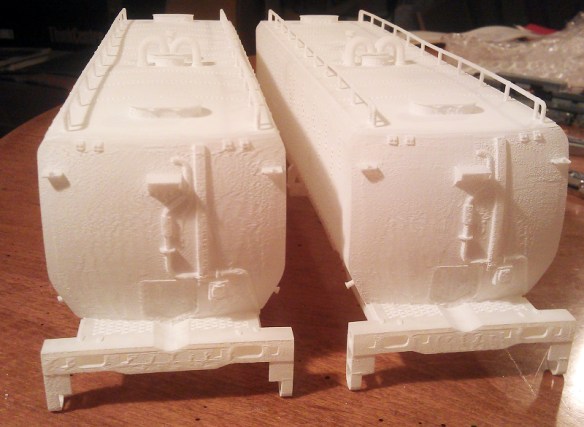
With all the loose powder removed any areas showing evidence of the printing process become clear.  On these particular models it was on the curved ends.  You can see in the picture below that there are ‘veins’ running down the end of the tender.

O Scale Tendre ends (Rough)

These are actually plastic and attached to the model.  To remove these I use my mini drill again with a small sanding stone bit; because it is tapered it allows me to get the flat surface across the face of the model.  The trick here is a little bit at a time, if you go at too hard it is very easy to remove too much.

Mini Drill - Small Sanding Stone

Once the area is ground flat, I use the soft brush bit again to remove any new dust.  In the picture below you can see the finished surface.  It is smooth to the touch.  You can still see the marks where the ‘veins’ were but these will disappear when the model is painted.

O Scale Tender Ends (Smoothed)

Painting the tenders will be the next step and I will share that with you in a later post.

Making your own DCC plugs and connectors

With a lot of DCC installations, particularly on older locomotives, the wires and plugs need to be modified in order to make them fit.  This often creates weak wire joints, especially in areas where the wires can move, so I wanted to find a way to protect these areas.

Recently I have been installing single DCC decoders in multiple locomotive consists; below is a set of Con-Cor Alco PA/PB units.

Con-Cor DRGW PA-PB-PA

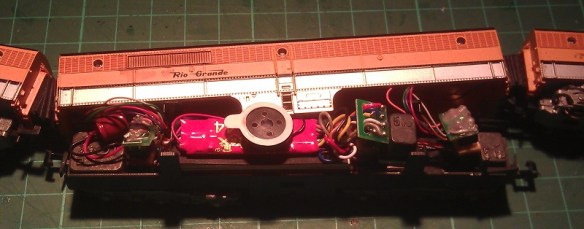
Both the PA (Cab units) are powered and the PB (Cabless booster) is a dummy.  Inside the PB I have installed a Digitrax sound decoder with the wires running through the corridor connections to the two motors, similar to the Con-Cor EMD E7 DCC installation from my previous post.

I decided to add connectors into the system so I could separate the units if required, which also made it easier to trace any faults such as short circuits whilst testing the units.  Below is an image of the wire harness before it was fitted into the PB unit.  The bit in the middle is a socket for the DCC decoder with a homemade plug fitted into it which joins all the wires together for DC operation and testing.

PA Wire Harnes

Although the wires are soldered to the pins, they are still delicate and given the limited number of strands, individually the wires could easily be broken off.  To prevent this from happening, after I had tested the harness I painted the soldered connections and wire ends with a PVA glue. I used a cheap PVA designed for school projects from a local art shop. The PVA went on well and as it went tacky it held in all the pockets between the wires.

PVA Socket

I also added a second coat a few hours later to ensure I had good coverage.  Once dried it went clear and held all the wires in place, plus it gave them a coating to prevent any shorting.  I also did the same thing with the plug ends.

PVA Plug

Once everything is assembled the PA units can be separated from the PB unit by simply pulling the plug without risking damage to the soldered wires at their weakest point.

Con-Co PA-PB with Sound

Another advantage of this is a second PB dummy unit (or possibly a powered unit) could be added into the consist as long as it had the same wires and plugs running through it.

Here is as short video of the D&RGW Prospector pulling into Solent Summit station.

Sadly the sound decoder speaker is not as loud as the noise from the older Con-Cor motors which drowned it out, but that is a challenge for another post.

Cost-effective DCC installs for consisted locomotives

With Digital Command Control becoming ever more popular more clubs and home layouts are switching to it, but it can be quite costly to convert all your locomotives to DCC, so I’ve been looking at ways to make this cheaper.

A lot of US outline trains run with several powered units forming one consist and using one DCC decoder for the whole consist is my plan.   A good example of this is the set of powered EMD E7 units below.

IMAG0242

These models, made by Con-Cor, will always be run as a set and although the middle unit is a dummy locomotive the other two would normally both require a DCC decoder.  This is because there’s no electrical connection between the three units and, despite both being good runners, the two powered units run at different speeds.   This is a problem because one locomotive will always be pushing or pulling harder than the other.

Below is a video of the two powered units (without their shells) on a DC test track.

Clearly you can see that the nearest locomotive runs much faster than the other.  This is because the motor in the nearest locomotive has a much lower starting voltage.  If both locomotives had their own DDC decoder fitted they could be speed matched.  This is done by adjusting the DCC configuration variables using a DDC controller or a system plugged into a computer.  Doing this effectively alters the starting voltage of one or both of the locomotives to make them run at the same speed.  The drawback of this is that you would still need two decoders, an understanding of how to do this, and, if the train is run on a DC layout, the problem would still be there as the CV settings do not have any affect under DC control.

An alternative is to increase the starting voltage of the faster locomotive motor.  An easy way to do this is to add some resistance into the electrical circuit, but this can cause other problems as resisters do this by turning the unwanted power into heat.

A better way is to add a diode into one of the motor feeds.  A diode works by only allowing DC power to flow in one direction whilst causing about a 1.5 volt drop.  Of course this would mean the motor could only run in one direction so a second diode will also need to be used at the same location but positioned in the other direction.  This meas that the power going to the motor will always pass through a diode irrelevant of the direction of the locomotive but with a reduced voltage.

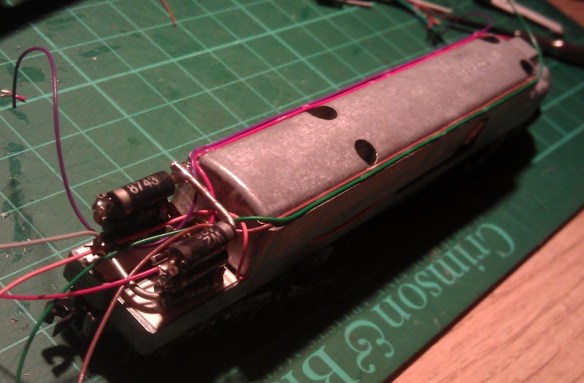
Depending on the speed difference you have between the two locomotives, you may need to use more diodes to give a bigger voltage drop.  For this particular pair of locomotives three diodes, giving a voltage drop of 4.5v, were required in order to make the two motors run at the same speeds.  There is room between the main chassis and the shell so I constructed the diode circuit to fit in this space using 6 diodes; three for each direction.

Diodes E7 Chassis E7 Chassis With Diodes

E7 Chassis Ready For Shell

With the diode circuit fitted into one of the motor feeds you can see the difference in this video, also on a DC test track.

Now the two power units run at the same speed I can use one DCC decoder to power both motors.  It is important to select a decoder that has a maximum current capacity that is more than the combined current draw of the two motors.  This can easy be checked with an amp meter.  With the shell removed from your locomotive, connect a DC controller to your locomotive, passing one of the motor feeds through the amp meter.  Then using your fingers, prevent the motor from turning and turn on the controller.  The motor will try to turn but will stall as you have it clamped in your fingers, and the amp meter will measure the maximum current drawn by the motor.  Do this with both motors and add the values together.  If the combined value is less that the maximum current capacity of your chosen decoder then it will be ok.

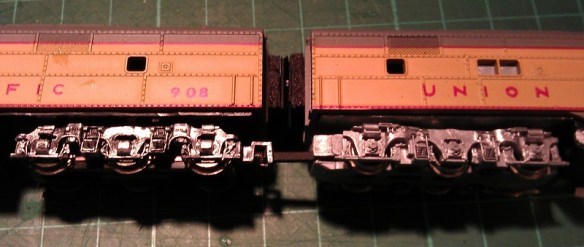
As there’s lots of space inside the dummy unit the DCC decoder is installed in there.  I used a Digitrax decoder and ran the wires through the corridor connections.  This causes a small problem in that the three locomotives are now permanently fixed together by wires; should they come uncoupled it could put too much strain on the wires and cause damage.  To solve this the couplings have been replaced with 3D printed permanent couplings.

Fixed Coupling 1

These have the same ends as Rapido-style couplings and are a direct replacement using the same spring.  A flexible corridor connection was also made using black foam and corrugated card.

E7 Coupling 1 E7 Coupling 2

The chassis for the dummy unit is actually a different make, Life-Like, but this is a bonus because it has power pickup on the trucks.  All three units have power pickups that can now be connected together which greatly improves the performance of the combined locomotives.  So this three unit EMD E7 set is now DCC converted using only one DCC decoder.  Here they are pulling ‘The City Of Los Angeles’ on the GAMRG’s layout at the 2014 NMRA winter meet in Benson, UK.

Hopefully this will save you money on upgrading your locomotives to DCC, which can become incredibly costly given some size layouts and train collections. I’ve been experimenting in a similar way with a sound decoder; if I make any notable progress I’ll post it here.

Fixing bowing problems in 3D FUD printed models

Now the prints have arrived it’s time to clean them up and get them ready for painting. Actually I’ve had 3 versions of the log car printed so far with each being an improvement on the last.  The first was very short on detail, due to some modeling errors which have now all been fixed.  The second came out very well although I was unhappy with the deck planks all being exactly the same length; this caused the plank detail to disappear and the model looked too square and a little unrealistic.  The third and current version looks fantastic, although when I opened the box from Shapeways I could see there was a problem.  There was a bow in the main deck of the car.  I have had this before with other prints and it has resolved itself during the cleaning process. (please see my FAQs for more information on the cleaning process).

All the parts where put into a jar containing Goo Gone to remove the wax residue as normal.  I was hoping this might help soften the FUD material and fix the problem but unfortunately this time it increased it.  Here is the car after the cleaning process was complete.Log car with bow

So why does this happen?  Well the FUD material is printed along with a wax that supports the delicate parts as the print is developed layer by layer.  Once the print run is complete the parts are put into an oven to melt away the wax.  When the parts are removed and left to cool, one side will cool quicker than the other, and because this car is long and thin it will cause it to curl, very similar to the effect caused by heating and cooling a Bimetallic strip.

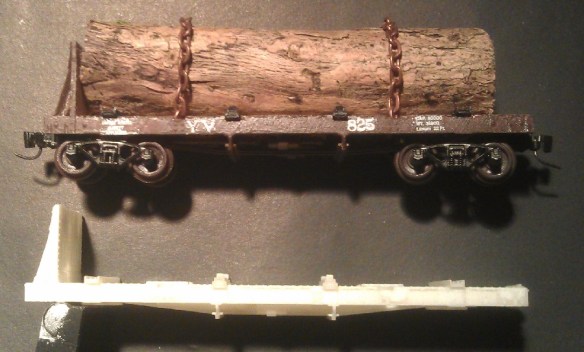
Although the Goo Gone softened the FUD material it was not enough to undo this effect, and leaving it to dry again caused the bow to increase.  However this can be removed from the model by using hot water.  Water at 150F (66°) will bring the model back to the temperature of the oven and the bend can be reshaped and as it cools it will hold the new shape.  For this log car, after making a cup of tea and letting the water in the kettle cool for a few minutes, I poured a small amount of the hot water over the middle of the car.  Almost at once it became softer and flexible, the bend straightened without any effort and I held the car in my fingers as it cooled and became ridged again.  In the photo below, the lower car is the one that had the bow in it.

Log car without bowI had to be careful as it cooled not to let the effect make the car bow the other way, if this did happen I could simply pour on a bit more hot water.  I will now leave the car to totally dry overnight, checking that the bow does not come back.

In the next post we will look at painting and decaling the car.