Union Pacific Rotary Snow Plows

Although I have may projects currently working through the system there is always room for one more and this week, given how cold it is and in some parts snowy, it seems the ideal time to start sharing with you my plans for an N Scale Union Pacific rotary snow plow.

This project is at the request of a fellow modeller but it’s one I have been thinking about for a while for myself, I think the rotarys are just fantastic!

So what are rotary snow plows?  In short they’re the last line of defense against heavy snow fall; when the snow’s falling and regular plows and shovels simply can’t do it the rotarys are called out to cut their way through. And they do literally cut their way through.  In the image below, taken by Steve Patterson and displayed on Railpictures you can see ex-DRGW steam rotary ‘OY’ being pushed by three steam locomotives.
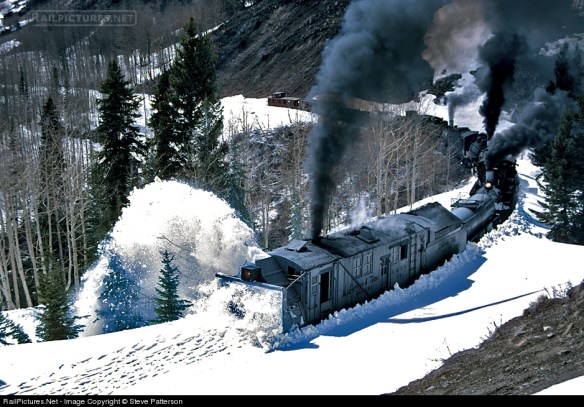
The photo caption says: ‘In an attempt to open its line from winter snows, Cumbres & Toltec Scenic operated a triple-header rotary snow plow train on May 3, 1997. Three mikados are shoving Rotary OY as they near the deepest snow encountered on Windy Point, Colo., just short of the summit at Cumbres Pass which wouldn’t be achieved until the next day. The footprints in the snow ahead of the rotary are from pursuing photographers.’

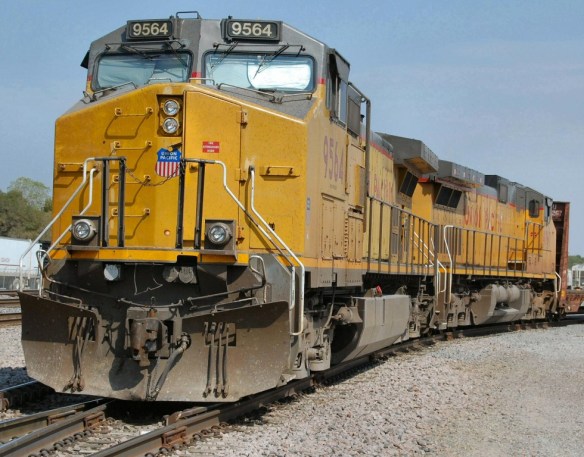
Regular snow plows work by forcing the show aside and for the majority of areas this is just fine.  In winter months you can often see plows fitted to regular locomotives as with UP 9564 in the photo below. (Picture from Home Town by Handlebar).
But when it gets a bit deeper the plow has nowhere to push the snow so it needs to be lifted above.  This can be done with a larger dedicated plow which is pushed by locomotives as shown below. (Photo by Kevin Burkholder and displayed on Railpictures).
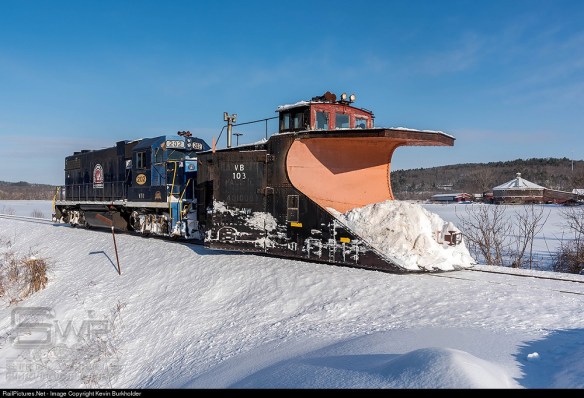
The large ‘scoop’ at the front pushes the snow up and out to the sides, the ‘wings’ (behind the plow with VB 103 marked on the side) can be adjusted to push the snow even further, and retracted to pass objects close to rails.  Plows like this come in all sorts of shapes and sizes as railroads tended to build their own out of freight cars, caboose and tenders.  The important thing is they needed to be heavy as hitting a snow bank at speed creates quite an impact as you can see in the video below. (courtesy of James Adeney from You Tube).

But when the snow gets really deep you simply can’t push through so out come the rotarys.  At the front, as shown below, is a large rotating cutting face or fan.  This breaks the snow down and forces it out a chute on the top.  The chute can be angled to the left or right and throws the snow far away from the railroad. (Photo by Alix Gillman and displayed on Railpictures).

The rotarys move much slower than the plows as they cut through but the only limitation is the amount of power to the fan and how much tractive effort is pushing it into the snow.  Typically rotarys are not self-propelled, all the power they generate is used to drive the fan, so they will often be seen with several power units pushing from behind.  The early rotarys were all steam-powered which gave the added advantage of heat.  Not only would the boiler provide steam to drive the fan but also to melt the ice which built up around the front.  The steam rotary below, pictured by Brian Snelson on Flicker, was built in 1898 and was used right up until 1968.  It’s typical of an early design with a  traditional steam engine tender behind for fuel and water.

As these machines were not in constant use, often only used every five to ten years, they were kept in running order but had little need for updating.  However as steam started to become obsolete on the class one railroads they started converting them to diesel and electric power.  A good example of this is the Southern Pacific with their route over Donner Pass.  They converted the actual rotary to electric power.  It was also coupled to a spare EMD F7 B unit which had its traction motors removed and all four installed into the rotary to power the fan.  The B unit produced the power for the fan motors.  A steam generator was also fitted to keep the front clear of ice and supply warmth to the crew.  Controls were added so the crew could control the pushing locomotives from up front.  In the image below you can see two rotarys and their F7B units, one at each end of some modern locomotives, as they wait for a passenger train to pass.  Up in the high mountains of Donner Pass they often worked like this so they could clear snow in both directions continuously. (Photo by Jake Miille Photography)

This photo is accompanied by a short video of the rotarys working on Donner Pass on February 25th, 2017.

Although the Union Pacific Railroad had many steam rotarys over the years purchased from specialist manufacturers, in the late 1950’s and 1960’s they also built some of their own and it’s one of these which I’m creating a model of.  As they started from scratch on their new rotarys it was easy to build them just how they wanted.

UP 900080 was constructed in 1958 at the UP Omaha shops.  It was built on the frame and rear truck from a retired ex C&O steam tender.  It has a 1750hp diesel engine to drive the 12′ rotary fan, weighs 347,240 pounds, is 50′-9″ long and 16′-8″ high. (Photo by Steve Patterson and displayed on Railpictures).

UP 900081 was constructed in 1966 at the UP Omaha shops again on the frame and rear truck from a retired ex C&O steam tender.  This time UP put in a 3000 hp diesel engine making this rotary the most powerful and weighing 367,400 pounds also the heaviest rotary in the United States.  It is 52′-2″ long, 17′ high and the rotary fan is 12′ in diameter.  (Photo by Joe Bracey and displayed on Railpictures).

UP 900082 was constructed in 1971 also at the UP Omaha shops. It has a 2500 hp diesel engine, weighs 284,500 pounds, is 55′-3″ length, 17′ high and has a rotary fan 12′ in diameter.  (Photo by Mike Danneman and displayed on Railpictures).

Out of the three 900080 and 900082 are still in service but sadly 900081 was damaged in 1994.  UP retired the rotary but donated it to the Museum of Transportation, St. Louis, Missouri later that year where it’s now on display.

As 900081 was the most powerful, 900082 currently holds that honor, it’s this one which I’m modeling, although it’s very similar to 900082 so it could be used for either.  The plan is to have a free rolling chassis but still have a motor inside to power the fan.  To do this I will most likely use a commercial chassis from a diesel locomotive and remove the drive gear from the truck towers.  Then I’ll connect the drive shaft to the fan.  Sounds very similar to what SP did with theirs!

Next week I’ll share with you some of the design drawings and go over some of the finer details I intend for the model.  To round-up this week’s post I’ll leave you with two videos of the White Pass & Yukon Railway’s steam rotary plow doing what it does best. (Both courtesy of Murray Lundberg from You Tube).

Adding Real Coal Loads To Hoppers

Happy New Year!

2018 is here and after a little time off over the Christmas holiday I’m ready to get stuck back into modeling, 3D printing and generally anything train-related.  And what better way than a blog post about something I’ve been working on that you can also do.

Over the years I’ve collected many different coal cars and the only thing I don’t like about them is the identical plastic coal loads.  So this week’s post is a ‘how to’ for adding real coal loads to hopper cars.

Of course modern block coal trains do have very similar loads in the cars because they are all filled from the same place at controlled intervals and look something like this. (Photo taken by Lewis Bogaty, see his blog here)

But depending on where the load comes from will depend on the size of coal pieces as shown in the image below. (Photo from Virginia Tech Imagebase).

The shape of the load is also effected by the type of coal chute and the operator.  For me I like my coal loads to look something like the cars below; with a twin mound and a random unevenness.  These are Lionel O scale cars, and if you look closely you can see the coal loads are identical!
So what do I do?  Firstly I pick a coal to use; I’ve been using Woodland Scenics’ Mine Run coal, it’s not actually coal but looks just like it and it weighs next to nothing.

Unless the car has a load which is the right shape and set low in the car (I’ll explain what to do with those later) I remove the original load.

This would also be the best time to add any weathering to the car so it doesn’t get onto the coal load. But for this particular car I haven’t done that as it already has a grubby look.

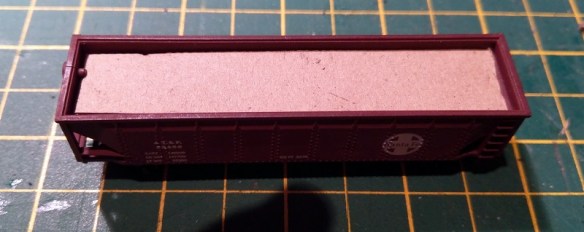
Next I cut a piece of rectangular card which is the same size as the top the car.  It doesn’t have to be an exact fit but it wants to be snug.

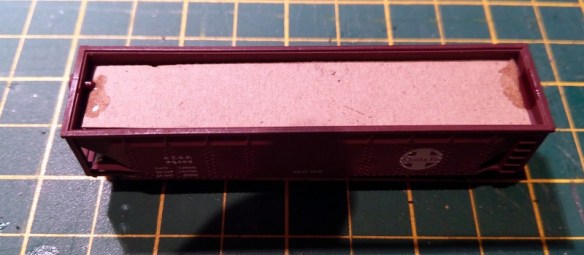
The card wants to be set down from the top rim.  This has two functions, it gives me a level to work from and saves me filling the whole car with coal.

To hold it in place I use a splash of super glue on each end.  Any glue will do but I like to do this fairly quickly and superglue sets very fast.  In my previous posts you may have seen me use the Gel superglue which I normally prefer as it doesn’t run.  But today I want it to run into the gap so I’m using the regular stuff.

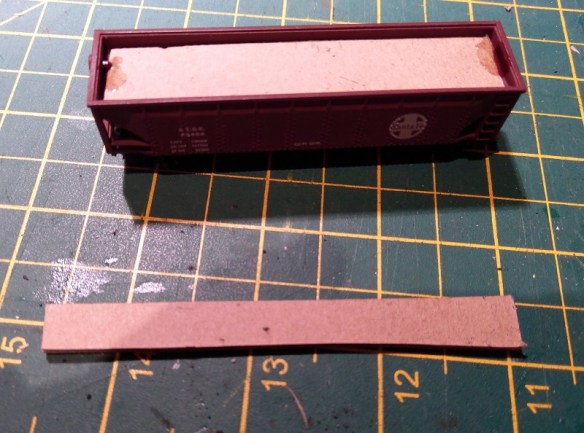
Next I cut a second strip of card which is thinner than the original, about half as wide.

The second strip is then cut into two pieces.  These will form the mounds, and if you want three mounds simply make them shorter and add a third.

Using my craft knife I cut the mounds at forty-five degrees to make a chamfer.

I repeat this on all four sides.  It doesn’t have to be perfect as it’s going to be covered with coal!

I then put some super glue where the mounds will be.

And place the mounds, trying to get them centered in the car.

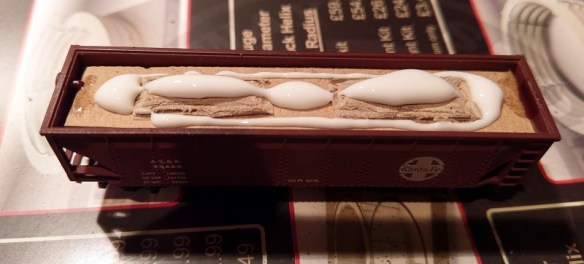
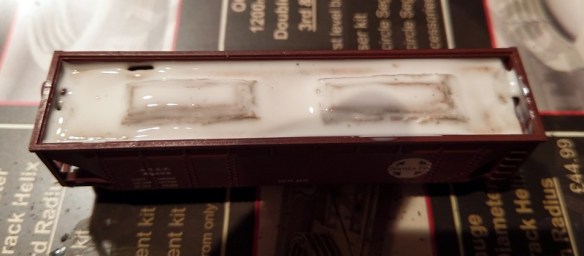
Next I use a white glue, simply placed in the car as below.  Woodland Scenics’ Scenic Cement will work or any white glue but I like to use Tacky Glue, simply because it sets quickly and speeds up the operation.

Using and old brush I spread it all over the card trying not to get any on the top edge of the car.

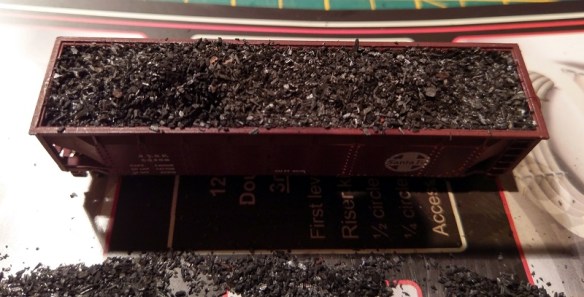
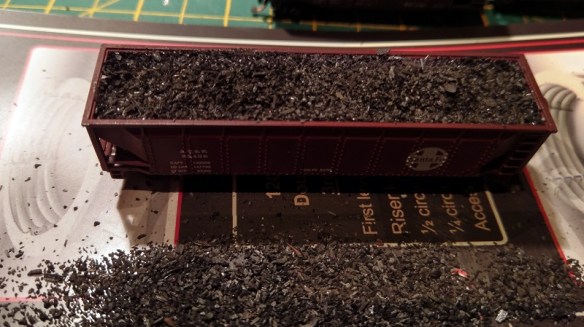
Then the fun bit, simply pour the coal on top.  I recommend doing this on a piece of paper so the excess coal can be picked up and reused.

After about 5 minutes, if you are using Tacky Glue, turn the car over and all the excess coal will fall off.

Pick off any bits that have stuck to the top edge before they set permanently.

If, like me, you want the mounds to be a bit higher simply add a bit  more glue to the top of the mounds.  Also if there’s a hole or gap add some glue there as well.

Then re-cover the car with coal.

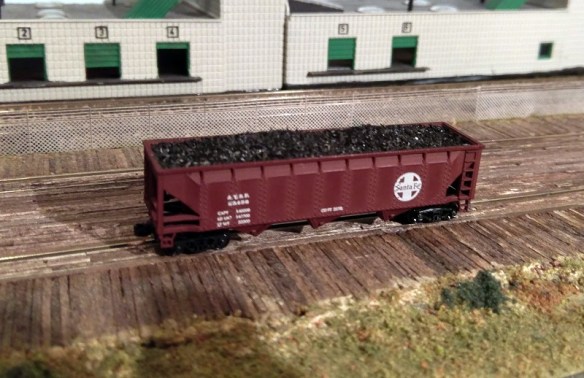
After another 5 minutes tip over again to remove the excess and you should be left with a natural-looking load of coal.

I then leave the car overnight just to make sure all the glue sets.  And the car is now ready for the railroad.

Earlier in the post I spoke about cars which have a plastic load which is the right shape and set low in the car.  When the load is set low there is room on top for extra coal without it looking over full. These are easy to do, simply cover the plastic load with white glue, again avoiding the top edge, and pour on the coal.  Even though the plastic loads will be the same shape the poured on coal will take a slightly different pattern each time.

And that’s it for the first post of 2018, I will be back next week with more. In the meantime I’d just like to wish you a great New Year and I look forward to sharing more of my train projects with you.

3D Printed Minitrix Cross Heads Part 2

Two weeks ago I shared with you my designs for a 3D printed replacement N Scale Minitrix cross head; you can read the post here.  This week I have the actual 3D printed cross head to show you.

The design, as pictured below, followed the original closely with the exception of the weaker areas which were strengthened by adding a bit more material.

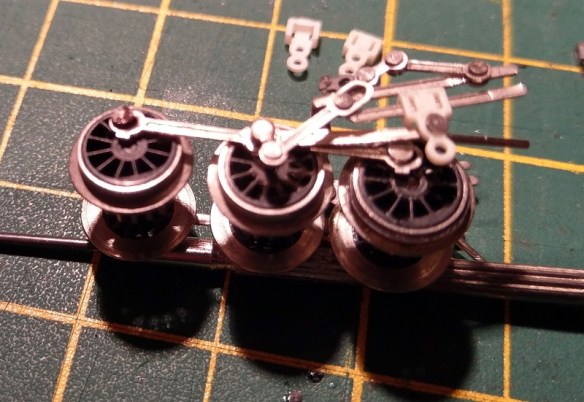
The actual parts look like this, next to a broken original.

The parts have been cleaned by submerging in Goo Gone for 24 hours, rinsed in warm water and left for a further 24 hours in open air; this is my normal cleaning process for all parts 3D printed in Shapeways’ FUD and FXD materials.

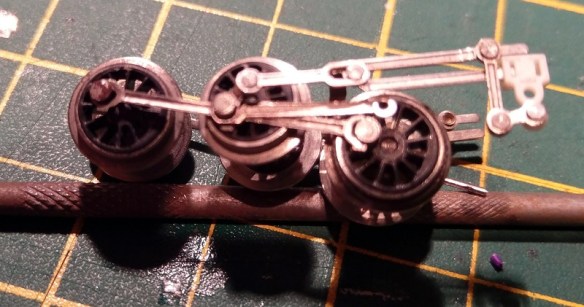
In the image below you can see a new and an old cross head on the slide bar, the slots in the sides are just right to allow the crosshead to slide without being too tight or too loose.

The upper hole on the cross head is for the piston and connecting rod joint and as you can see below this fits together well.  The piston is actually a bar with a ninety degree bend in.  The bar passes through the cross head then the connecting rod.  When it comes to getting the bend through the two parts it needs a bit of a push.  This also stops the bar from falling out.

One thing I did learn at this point is the piston bar needs to be fitted after the lower hole is connected otherwise it’s very hard to assemble!  So it came out again.

Also, to connect the lower hole, make sure the crosshead is on the slider bar first. Don’t ask me how I know that!

The lower hole connects to part of the valve gear. This time it uses a metal pin.  The pin is actually a tube and the end is flared over to prevent it falling out.  I carefully un-flared the pin by squeezing it together with a pair of tweezers.  Then the remaining part of the old crosshead fell away and I was able to push the pin through the new one.  This is probably the stage when the new cross head is most at risk of breaking, so try to make the end of the pin as close to the diameter of the pin as you can.  Once it has passed through the pin can be re-flared by pushing in a needle file or something similar.  It doesn’t need to be flared much, just enough to stop the pin from passing back through the hole.

The piston bar can now be inserted, completing this part of the assembly.

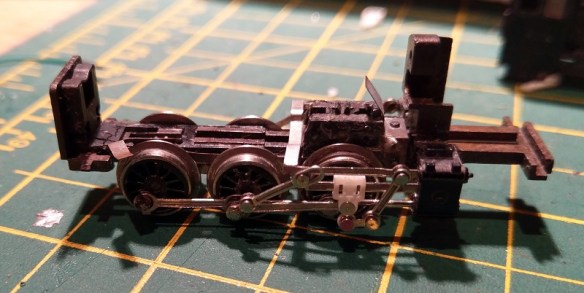
The wheels and motion can now be inserted into the chassis; this is a really tricky job!

And here we have a repaired Minitrix cross head.  The chassis rolls up and down freely and is ready to have the motor and other parts refitted.

The cross head is available on my Shapeways shop in sets of two and four here via the links.

I will also try to keep a few in stock, although not until after Christmas, so you can also contact me directly for a set.  I will also offer the cross heads in a set, along with my replacement Minitrix Eccentric Rod Crank Pins.

Next week I’ll have another how-to to share with you about coal loads.

A Plastic Screw for an N Scale Con-Cor PA

This week I’d hoped to show you the 3D printed replacement Minitrix Crosshead from last week’s post however due to the heavier than normal snows last night I’ve had no delivery today. So this week I’ll share with you something else which should also be arriving soon.

The venerable Con-Cor Alco PA has been around since 1967 and has been improved over the years but the original design, made by Kato under the name Sekisui, can still be found going strong on many layouts; mine included.  One of the things which made this design different from the later is how the chassis sections are fixed together.  The original design had a solid metal section on the top and two metal sections below, one making contact with each rail through the trucks. Between the top and bottom sections is a strip of plastic for electronic isolation.  It’s all clamped together with screws, metal ones on one side to conduct power from the lower section to the top, and plastic screws on the other to isolate that section.  This works well, but the plastic screws, if removed a lot, can easily be rounded off.  Plus if you drop one into the bottomless depths of an exhibition hall they are very hard to replace.

But thankfully I have a solution.

These have been designed to be 3D printed in Shapeways’ Frosted Ultra Detail material to give the required accuracy for the thread and hardness for the actual screw.

Hopefully these will be delivered soon, along with the other parts, and I will be able to share some photos with you next week.  Plus it will be nice to have my Alco PA back on the tracks.

3D Printed Minitrix Cross Heads

Trix produced a variety of locomotives including a range in N scale, dating back to the 1960s, under the name Minitrix.  Many of these shared common parts and it’s one of these for which I’m creating a replacement; a Minitrix valve gear cross head.

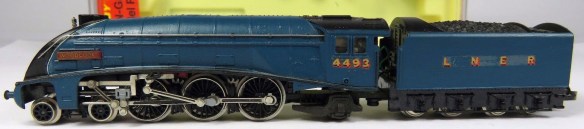
This particular cross head will be for the A4 steam locomotive model shown below.

The cross head is the gray slider which connects the piston and the main connecting rod.  This plastic part slides up and down the metal runner as the piston goes in and out, keeping it level and it also connects the valve gear linkage.

As with a lot of the early plastic parts these can become very brittle and start to break up.  Almost all the other parts of the locomotive’s motion are made from metal, the only exception is the crank pin which drives the eccentric rod.  This is also made from plastic and I’ve previously made this as a replacement 3D printed part; you can read more about that here.   You can identify the crank pin in the first image as it’s gray and not silver, just like the cross head.

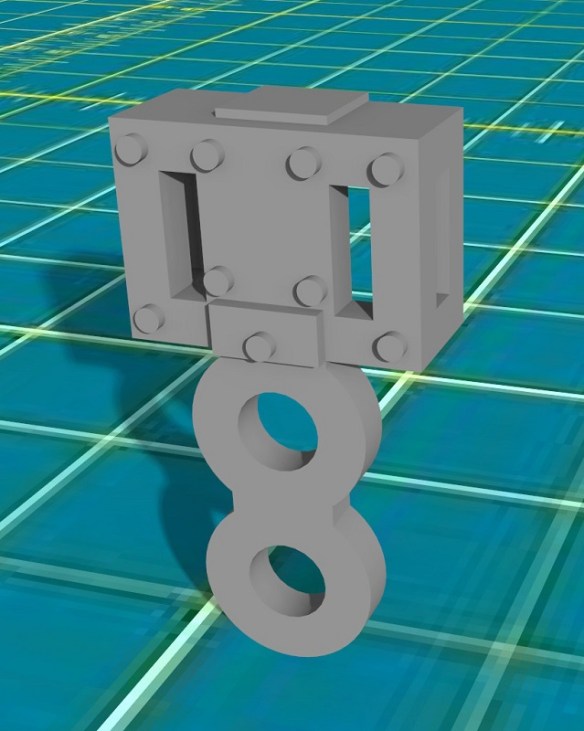
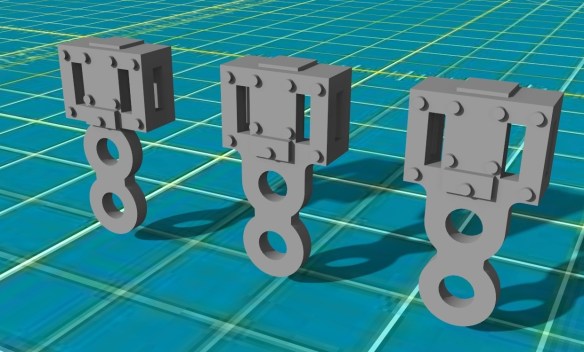
The original cross head is a very small part and very difficult to photograph up close so the image below is my 3D model of the part, without any modifications.

The cross head is symmetrical so it can be used on each side of the locomotive.  The box section on top has slots in the sides to allow the slider to pass through. Below the box is a pair of rings, the first connects the cross head to the connecting rod and piston.  As these are joined with a pin the connecting rod is able to rotate as the cross head slides back and forth. The second ring connects to the valve gear linkage, again with a pin allowing it to rotate.

The weak spot on these parts is where the rings connect to the box.  If the valve gear becomes jammed and the wheels keep turning a twisting force is applied at this point. If the plastic has started to break up it will simply snap.

In the image below you can see three cross heads with the original on the left.  The middle one has had the weak area under the box strengthened by adding a larger amount of plastic.  The right hand side one has also had the area between the loops strengthened in the same way and it’s this version which I’m test printing.

This cross head fits most of the British outline steam locomotives including the Gresley A3, A4, Standard 9F, Ivatt 2-6-2 Tank and the Ivatt 2-6-0.  Only the Britannia 7P had a different valve gear with a simplified cross head consisting of a folded metal plate.  Minitrix also made two steam locomotive for the American market, a 4-6-2 K4 and a 2-10-0 Decapod.  As the 2-10-0 shared the same chassis as the 9F this also has the same cross head.  The K4 shared the simpler Britannia 7P chassis.

The part has now been printed by Shapeways and I’m expecting it later this week, and once tested will be made available to buy. It’s often these small, seemingly insignificant parts that aren’t glamorous or even particularly interesting, that 3D printing really comes into its own. The ability to modify, improve and manufacture replacement parts at a fraction of the cost of replacing the locomotive means we can keep the majority of our stock rolling, and it’s why I continue to produce these parts.

Shapeways Special Offer

When it comes to internet sales today is considered to be one of the busiest in the year; Cyber Monday!  And not wanting to leave anybody out Shapeways are offering 10% off and free shipping on any purchase over $25.  Ideal if you were considering one of my recently orientated locomotive shells which you can read about here!

This offer is only available today, November 27th 2017, and runs out at 11.59pm PST.

All my Shapeways products can be found in my Shapeways shop here.

All you need to do to get the offer is enter the code ‘MAKEYOURHOLIDAY’ at the checkout, and purchase more than $25.

Happy Shopping!