A Tip to Avoid DCC Bus Wiring Headaches

In this post I have a simple tip that I always use when wiring up a layout which can save you hours of head-scratching and frustration.

Although DCC wiring can become complicated, the basic principle that all rail feeder wires are joined together applies. Well, all the left rails together and all the right rails together.  Even if you have sections separated with electronics like a Digitrax PM42 Quad Power Manager or different boosters, you’ll still have areas with lots of feeders joining to a common point or bus.  The frustration starts when you finish connecting all the feeders and you have a short where something is connecting the left and right rails.  The headache starts when you slowly start un-soldering wires or cutting feeders to find the short. It’s guaranteed to be the last one!

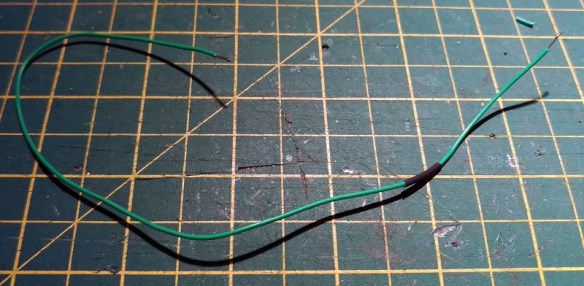
To avoid this I use a multi-meter as I work.  Just about all multi-meters have a setting for continuity.  Some even come with a buzzer which sounds when the probes touch.  In the image below you can see I have set my multi-meter to continuity.

Continuity Check

I always check the bus for continuity before I start and after I join each wire, or group of wires.  If I am working in an area with lots of feeders I sometimes clip the multi-meter to the rails or bus.  Then if a feeder with a problem, or the wrong feeder is touched to the bus, it will sound the alarm.

This simple tip has saved me hours of searching and re-working areas.

Some of the common causes of shorts when you’re building a layout are:

Shorts in the frog section of an Electrofrog point/turnout due to no insulating rail joiners being installed.

Shorts in the frog of a modified Electrofrog point/turnout because the jumper wires have not been removed.  See my post here regarding how to modify your points for better operation.

Copper strips used to hold the track in place when rails cross base boards joints.  If these are not cut in the middle they will short the rails.

And the biggest cause, believe it or not, are tools lying across the track.

Hopefully this will help you have a trouble-free time when wiring up your DCC bus.

Plugging it all Together

So again this week’s post will be nice a short one; the sun is shining here and I’m making the most of it!  But not wanting to leave you without something to read I thought I would answer another common question I get asked,  “How do we, at the Gosport Group, join our modular baseboards together electrically?”

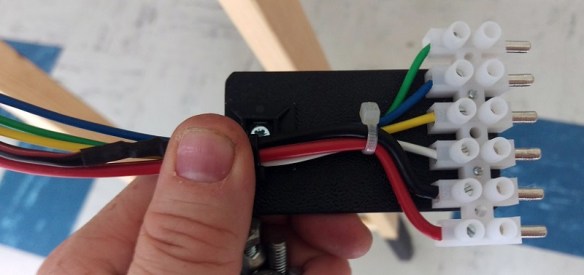
We use terminal blocks, or ‘Chock Blocks’, with male and female connectors.

Chock Block Plugs 3

Unlike a standard Chock Block there are only screws on one side of each strip.  The other has either the male or female connector attached to the screw clamp.

These work well and provide a positive, reliable connection.  The issue comes with the wires.  As the modules are always being moved about these wires are getting pulled and twisted a lot; after a while they break out or snap off from the connector.

To solve this a simple addition of a piece of plastic or wood makes all the difference.

Chock Block Plugs 1

The Chock Block is screwed to the plastic as well as a wire clasp.

Chock Block Plugs 4

This allows you to handle the connector without the risk of pulling the wires. A simple fix that saves a lot of work in the long run.

As for next week’s post? Well, let’s see how the sun holds up!

Electric Motors and Measuring Stall Currents

Often when I am writing about fitting DCC decoders into locomotives I recommend checking the stall current of the motor.  This should be done to make sure the DCC decoder is up to the job.  However I don’t think I have ever fully explained what this means or how to do it so this week’s post will be about exactly that.

Although DCC system supply a form of alternating current, AC, to the track, the electric motor still runs on direct current, DC.  The DCC decoder will convert the AC into DC using a bridge rectifier and supply the correct amount of voltage to make the motor run at the desired speed.  The higher the voltage, the faster the motor runs.  But what about power?  Simply adding more volts alone will not make the locomotive pull a heavier train.  The answer is current. Every electrical device will draw a current which is measured in amps.

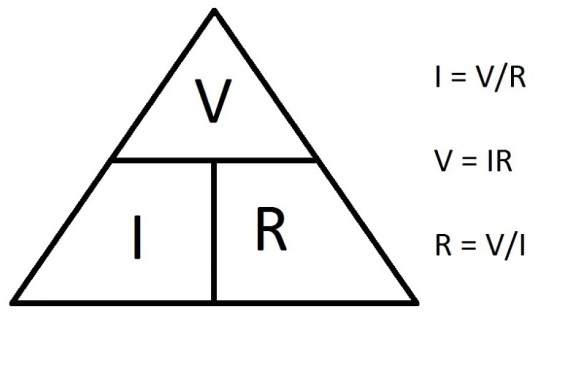
Without going too deep into the mathematics behind all of this, current can be explained in a simple equation: the current ‘I’ in amps (A) is equal to the voltage ‘V’ in volts (V) divided by the resistance ‘R’ in ohms (Ω):

Ohm's Law

So, for example, a train running at slow speed, light engine, will have little resistance and may pull 0.2 amp at 6 volts.  Add a heavy train and the motor now has a lot of resistance so it might pull 0.5 amp but still at 6 volts.  As the resistance is increased, adding more freight cars for example, the current draw will also increase until one of two things will happen.  Firstly, and most commonly with N Scale, the locomotive will start to wheel spin as the resistance, in this case friction, between the wheels and the track is weaker than the motor.  The current draw will drop off but the train won’t be going anywhere.  Secondly, the motor will stall.  This means that the motor will draw as much current as it can but simply cannot spin anymore because the train is too heavy and the friction between the wheels and rail is too great.  This might happen if you have good traction tires on your wheels or something gets stuck in the gears.  When a motor stalls like this the current draw will peak sometimes up to and over 1 amp and it’s this that can damage a decoder.

The electrical components in a DCC decoder are only designed to take a certain amount of amps through all the tiny wires and connections.  This is because high amperage draws cause a variety of issues, one is heat. This is normally dealt with by using bigger wires and components.

All DCC decoder manufacturers state what their decoders are capable of handling.  For example, below is the instruction manual for a Digitrax SDN136PS sound decoder; I put these into my C-855 locomotives.

DC Stall Test 1

The manual says the chip has a 1.0 Amp /2.0 Amp peak capacity.  This means that the normal operating current draw that this chip can sustain is 1.0 amp and for short periods it can sustain a peak of 2.0 amps. Anything over this will damage the decoder or cause it to shut down.

So how do you measure the stall current to see if your chosen decoder will work with your motor? Well, you’ll need some wire, a DC controller and one of these…

DC Stall Test 2

It’s a multi-meter.  It doesn’t have to be an expensive one; it simply has to have the ability to measure current up to at least 2 amps.  This particular one will measure up to 10 amps, so it will do nicely.  The red wire is plunged into the hole marked 10A and the black into the common.  The dial is rotated to the red 10A marker and you can see below it’s reading 0.00 amps.  It’s now ready to use.

DC Stall Test 3

I should point out – DO NOT do this with a locomotive that has a DCC decoder already installed as you may do damage to the decoder.

Using a section of spare track which is not connected to anything else, connect one wire from your DC controller to one rail.  Connect the other DC controller wire to the black multi-meter wire.  Lastly, connect the red multi-meter wire to the other rail.  Now when you put a locomotive on the track and run it up and down, the multi-meter will display the current the motor is drawing.  Normally with DC locomotives this will also include any current draw from lights as well.  Remember the max current draw of the decoder will be for everything, not just the motor.

The main reason for doing all this was to measure the stall current of the motor and to do that you will need to find a way to stop it spinning when it’s under full power, i.e. full throttle on your DC controller.  With N Scale this can often simply be done by removing the locomotive shell and stopping the motor with your fingers, although I would not recommend doing this with larger HO and O scale engines as they have some big motors!

With the motor ‘frozen’ between your fingers and the power on, the multi-meter should be reading the max current draw from the motor.  If this value is higher than the manufacturer recommends for the decoder then it will not be safe to use it.

Normally with N Scale locos the stall current is about 0.6 to 0.7 amps and with a few LEDs it may go up to 0.9.  Add sound and it could be up to 1.5 amps but as long as that is below the manufacturers specification than it’s still safe.

This has been useful when I’ve wanted to run two motors from one decoder. For example, my Bachmann F7s, which you can read about here.  They have two decoders for four locos.

Bacmann F7 DCC Install 36

Next week I’m going to share with you some of my newly-weathered stock, I just hope my photos do them justice!

Joining Wire with Solder and Heat Shrink

I’ve been having one of those weeks when you pick up a job and have to put it right back down again, as life throws you another curve ball.  But not wanting to drop the bat in this weeks post, I will be making it nice and short and answering another question I’m often asked at shows and exhibitions.  What’s the best way to join wires together?

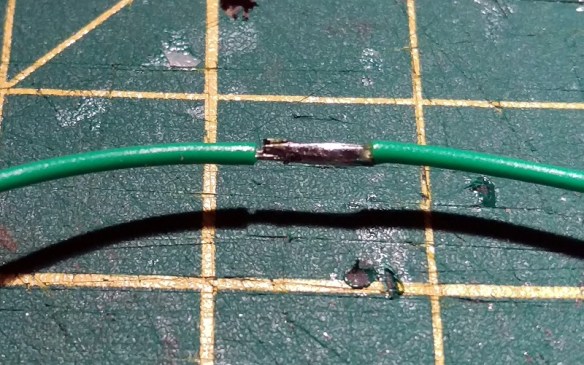
This question is normally asked in regards to fitting a DCC decoder into a non-DCC ready locomotive.  This is called hard wiring and normally requires connection of all the DCC decoder’s wires directly to the locomotive.  Often there are wires already in the locomotive that can be utilized and connected to.  And, as is often the case, there is very little room spare to make a connection.  The smallest, and best, method of joining the wires is to solder them together but this causes a problem.  At the point where the wires are soldered they are exposed, and could come into contact with the locomotive body or other wires and cause a short, or worse damage the decoder.

The answer is to use heat shrink.  This is readily available at most hobby shops and electrical stores, and there is endless supplies on the internet.  Heat shrink is a rubbery plastic tube that when heated shrinks to encase whatever is inside.  To show how I join wires together I did a quick demo.

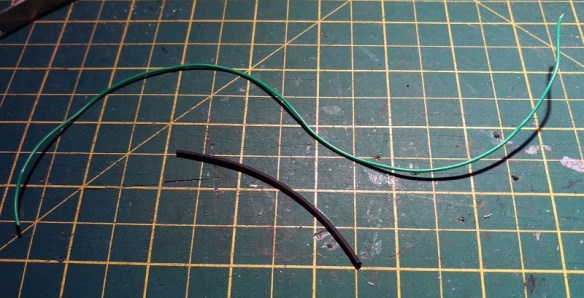
Below is a standard piece of multi core hook up wire and a piece of heat shrink that is just a bit bigger than the wire.

Wire Joint With Heat Shrink 1

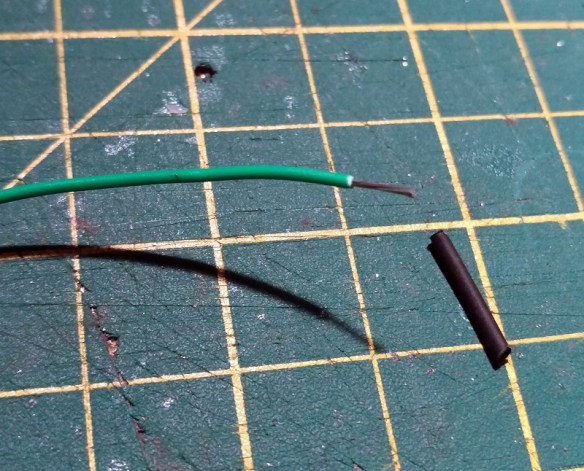
Using a pair of wire strips I strip back a about 4 of 5mm of the insulation and using a pair of snips cut off a piece of heat shrink slightly longer, maybe 10mm.

Wire Joint With Heat Shrink 2

The heat shrink is then slid over one wire end.  Normally you would have two wires 🙂

Wire Joint With Heat Shrink 3

Then using the soldering iron I tin the ends of the wires.  This means flooding the end of the wire with solder.  Depending on how powerful your soldering iron is will determine how long this takes, but typically it’s only about one to two seconds.  Hold the iron tip to one side of the wire and apply some solder to the other, as the heat runs through the wire it will melt the solder, causing it to flood into the wire.  You don’t need to add much, just enough to cover the individual strands.

Wire Joint With Heat Shrink 4

Then place the two tinned ends together, its easer if one is attached to something as you need one hand to hold the iron.

Wire Joint With Heat Shrink 5

Simply touching the iron on the two tinned ends for one or two seconds will cause the solder to flow together making a solid joint. This will now be stronger that the wire and will give the best electrical performance.  Note: make sure the heat shrink is not right next to the joint when you do this other wise it might react to any heat traveling down the wire and shrink where it is.

Wire Joint With Heat Shrink 6

Then, once cooled for a few seconds, slide the heat shrink over the joint.

Wire Joint With Heat Shrink 7

The bump in the heat shrink is simply where one of the wire ends was sticking out a bit.  If the heat shrink wont slide over you can squeeze the joint with a pair of pliers just enough to flatten it out.  Then its time to activate the heat shrink.  Normally this is done with a special heat gun but I simply use the tip of the soldering iron or a cigaret lighter if there is one handy.  Which there wasnt tonight!  The flame from the lighter will ensure it shrinks evenly but the iron tip will do the job although it looks a little rougher.

Wire Joint With Heat Shrink 8

And that is how I join wires.

Hopefully things will get back to normal this week and I can get back on track.  I will be at the Fordingbridge Model Railway Exhibition this coming weekend so I will hopefully bring you a review of the show and layouts in next weeks post.

Making a DCC Bus for Your Model Railroad

I have recently been helping a friend build a large OO Scale layout and one of the questions I’m regularly asked is ‘How do I make a robust and reliable DCC Bus?’ In this post I’ll share with you what I’ve done for him.

For those wondering why we need a DCC Bus or what is a DCC Bus, I will explain.  Traditionally model railroads have been powered using DC controllers and control panels with switches to turn sections on and off.  The advantage of this is the wire going to each section need only be capable of powering the train in operation.  Often telephone exchange wire or simple hook-up wire is used as it is cheap and can handle the low current draw over long distances.  However with DCC all of the track is powered at the same time and the more trains you run, the higher the current draw through the wire. Electricity always takes the path of least resistance and this could mean all the power for the layout could end up going down one wire.  If a small wire is used this can lead to loss of power or in worst cases, melted wires, which could lead to fire.

There are several ways to resolve this.  One option is to solder all the rails together and feed them close to the DCC controller but this leads to problems with expansion and contraction in different times of year.  This is not possible with modular layouts and sometimes it’s simply not possible as you need to add breaks at turnouts to prevent shorts.

Another option is to simply use big wires everywhere. However this is very cumbersome, expensive and bulky. Soldering big wires also takes more heat so when it comes to connecting them to the track there’s a bigger risk of meting the plastic ties.

The best option is to have a DCC Bus which consists of a pair of big wires that run around your layout under the base board.  Then use small hook-up wire as ‘droppers’ running from the track to the DCC bus.  It’s also recommended to have droppers for every section of track; that way you’re not relying on rail joiners to transfer current.

So what actual wire should you use?  Well, there’s no specific size but I try to stick to these American Wire Gages and colours.

DC/DCC Bus                         Red and Black                                     13 AWG

Track Feeders                       Red & Black – Under 9 inches             24 AWG

Track Feeders                       Red & Black – Over 9 inches               20 AWG

Frog Feed (For Turnouts)     Green                                                  24 AWG

A 13 AWG wire comes in all sorts of types but I have a good supply of thick six strand cable so that’s what I use.  It has good insulation and although flexible it tends to stay where you bend it.

One thing to avoid when making a DCC Bus is to limit the number of breaks and connections in the wire.  Breaks can cause resistance and bad electrical transfer.  For example, if you are using a high strand count wire and suitcase connectors (which cut into the wire) to join on the feeders; this is a bad idea.  At each connection a strand or two is broken and over the length of the cable the integrity can be affected.  Also, if the cable is split and joined together again at every feeder location with a chock-block, or similar connector, this can add lots of potential bad connections into the bus.

To show you how I avoid all the issues above I’m going to use one of the smaller sections of the layout as an example.  Below you can see the underside  of the module with the track feeders coming through the board.  As the modules are being built away from my friend’s house the DCC Bus will be soldered together once installed.  If I was building it in place I would just use a continuous wire.
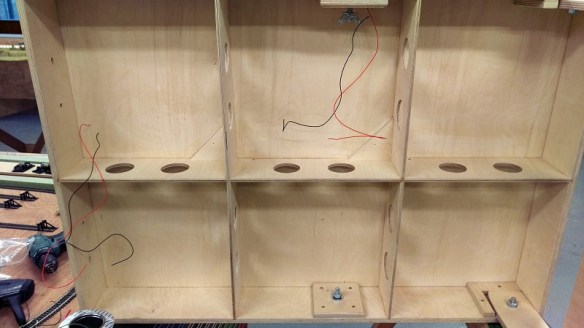
DCC Bus 1

I use Tag Strips, as pictured below.  These have been cut into lengths of three strips.

DCC Bus 2

The strips are held in place simply by bent sections of metal and, by squeezing these together with a pair of pliers, the middle strip can be removed.

DCC Bus 3

This allows the section of Tag Strip to be screwed to the underside of the module.
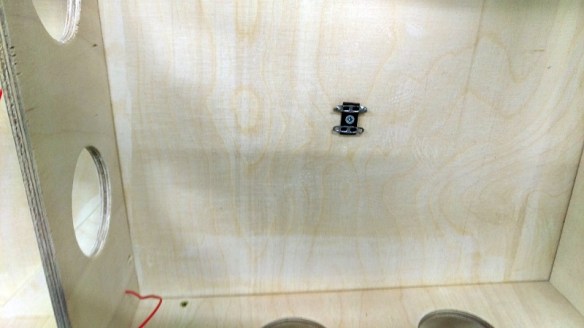
DCC Bus 4

I put a Tag Strip at each end of the module and, as you will see later, at any point where feeders come through the base board.
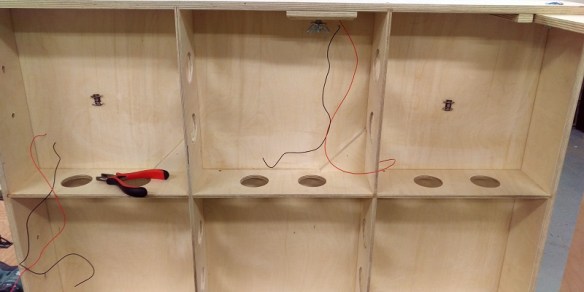
DCC Bus 5

Then I feed the DCC Bus cable through the module and, making sure there’s enough cable to reach the next board, strip back some of the insulation.
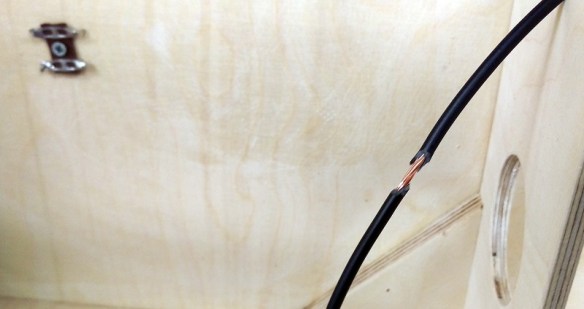
DCC Bus 6

Then I wrap about three inches of solder around the bare wire.
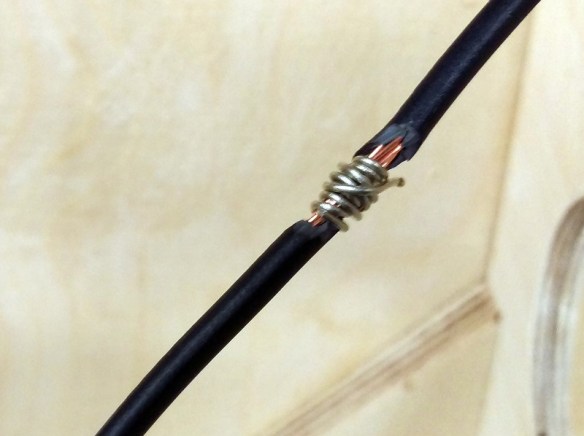
DCC Bus 7

The wire is then bent into a U shape.

DCC Bus 8

Then the solder is melted into the wire with the iron.  As the wire is thick it takes a lot of heat but leaves the shape solid and the wire is still continuous.

DCC Bus 9

I then tin the Tag Strip and place the soldered U section under the Tag Strip.  Then using the iron I heat up the strip and wire so all the solder flows together forming a solid joint.

DCC Bus 10

I repeat this with both wires at all Tag Strip locations and staple the wire to the module.
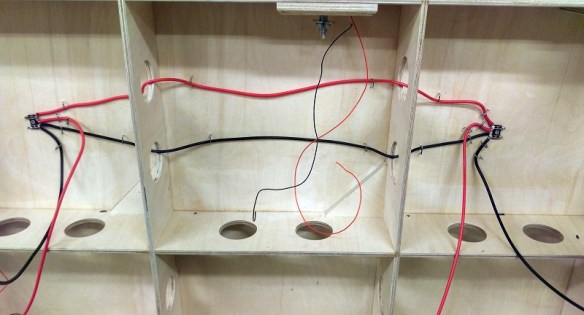
DCC Bus 11

The droppers are then soldered to the other sides of the Tag Strips.
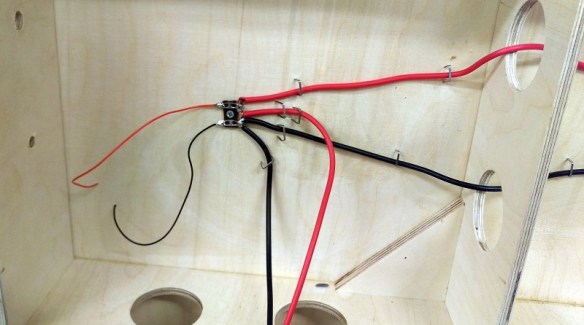
DCC Bus 13

And that completes the DCC Bus under this small board.

DCC Bus 12

Larger boards with lots more droppers are just as easy with the Tag Strip; connecting them all is simple as you can see below and if more need to be added at a later date they can simply be soldered on.
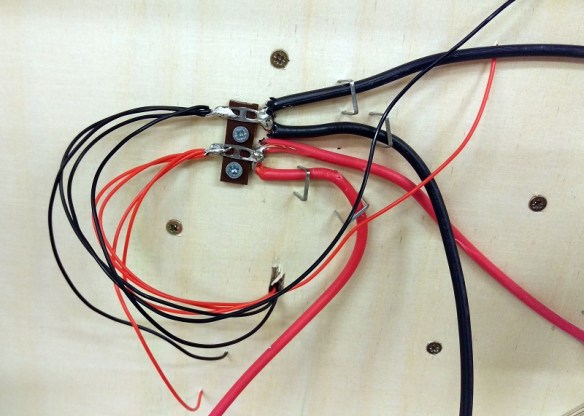
DCC Bus 14

This board had several Tag Strips in the middle of the board and again the DCC Bus is continuous without any breaks in the wires.
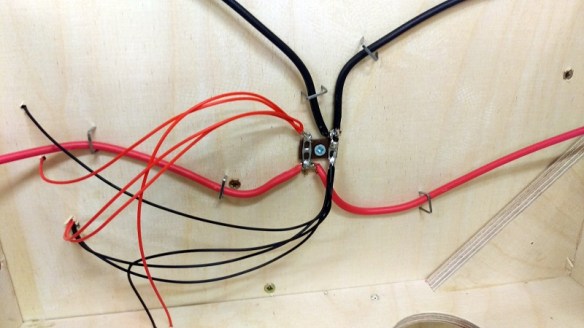
DCC Bus 15

Because the wire is nice and stiff it stays in place and can easily be held there with a few staples.  Below is another section of DCC Bus at the end of a module.
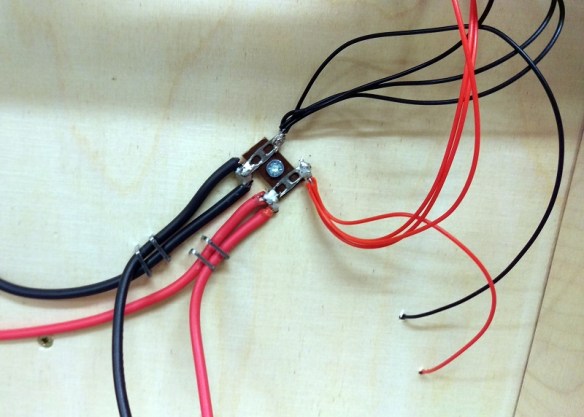
DCC Bus 16

I do have a few suggestions that might help when making the DCC Bus:

Each time you connect a set of feeder wires to a Tag Strip use a volt meter to do a continuity check between the red and black wires.  That way if a section of track hasn’t been cut properly at a turnout or point or there’s some other short issue it will always be located at the last wire you connected.  Otherwise when you finish a whole board and there’s a short it can take ages to find and may end up having to undo all your work.

When you bend the main DCC Bus wire into a U shape, don’t solder the wire first as you won’t be able to bend it.

When you heat up the Tag Strip to connect the DCC Bus wire make sure it’s a good connection and that the solder runs together otherwise you could have a dry joint that will add resistance or lack of connection into the system.

Make sure your droppers are a sensible length, if they’re too short it means you’ll need more Tag Strip locations.

When running the bus wires try to keep them apart by a few inches; this will eliminate any issues caused by induction.  This can have tiny effects on the DCC signals.

And lastly, double-check you have enough length at the ends your modules to join the DCC Bus together.

I find by doing all of this I end up with a strong bulletproof wiring system which leads to well running trains.

In next week’s post I will have some more to share with you about my Alco C-855 project.

Replacing Con-Cor U50, Turbine & JTP C-855 Wheelsets

This week’s post is a little bit different in that it’s a guest post.  Fellow N Scale modeller Mike Musick has written an article about improving Con-Cors N Scale U50s, Turbines, and my imminent C-855 by replacing the wheel sets.

So without further ado, I hand you over to Mike.

BETTER WHEEL APPEARANCE FOR CON-COR U50 MODELS
(Also applies to Con-Cor Veranda Turbines)
———————————————-

The Con-Cor U50’s ungainly aesthetics are not helped by its oversize wheels. In all production runs the wheels measure to a scale 48″, versus the prototype’s 40″. While the 0.025″ increase in model height alone doesn’t alter the proportions perceptibly, the too-large diameter plus the oversized flanges of the 1970s design result in the wheels being visible above the truck frame, giving the model a toy-like appearance.

Oddly, the Con-Cor/Kato model of the PA produced prior to the U50 had nearly-correct wheel diameters. Replacing the U50 driven wheels (eight of the sixteen) with PA wheelsets is a straight-across swap since the gear and axle sizes are the same. However, it does require the sacrifice of an out-of-production PA model, and carries forward the large flanges of the era. It also doesn’t solve the issue of the undriven idler axles on the inner U50 trucks, which have cone-point bearings.

Fortunately, there are wheels and point-axle wheelsets available from Northwest Short Line (nwsl.com) for retrofit. The separate wheels work well and look good, but will require fabrication of half-axles to work with the Con-Cor gearing. We are specifying 42″ wheels as opposed to 40″ to stay out of trouble with truck frame clearance issues on less-than-perfect track.

NWSL Wheels
———–

Powered axles use NWSL #96000110, “N scale WHEEL ONLY, 42″/64 NS, 3/32″ bore”. You will need eight (8) wheels per locomotive.

Unpowered axles use a custom wheelset, specified as “N 42″/64 wheels on Pointed 1.5mm x .560″ axle (4/pkg)”. A single package of four (4) wheels covers each locomotive. Specify bright NS finish to match the powered wheels.

Installation
————

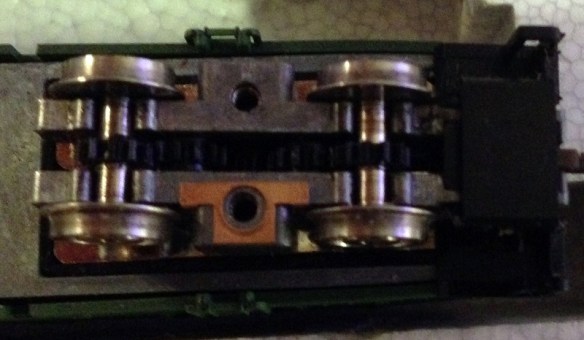
Removing wheelsets is a simple operation. Remove the two screws in the driven trucks, and the outer frame will lift off, with the idler truck probably lifting off at the same time. The driven wheelsets will be easy to remove. On some production runs there is a brass shim on one side of the center frame, be sure to note the orientation before removing the second axle.

With each idler truck separated from the driven truck, unscrew the single frame screw from the weight to access the wheelsets. Snap out the wheelsets and replace with the NWSL point-axle versions. Reassemble frame and set aside for later assembly with the driven trucks.

Carefully remove the half-axles from the gears by firmly pulling. Be careful to not use any bending forces against the plastic gear shaft since it is easily bent, resulting in a wobbly finished axle.

For the new half-axles, use 3/32″ K&S brass tubing in the standard hobby-store wall thickness. Cut eight pieces of this tubing to a moderately precise 0.193″, as this determines wheel gauge. Dress each cut end with a needle file, then insert each piece of tubing into a wheel so the end of the tubing is flush with the outer hub. Don’t rely on measuring the old half-axles to determine axle length. They are 0.200″. The 0.007″ difference corresponds to the narrower tread of the NWSL “/64″ wheel size.

DO NOT try to press the new half-axles onto a gear shaft! At least not yet. The tubing must first be reamed to fit the gear shaft; attempts to press-fit without reaming will likely result in a broken gear shaft. First dress the inner edge of the tubing with a micro needle file or jeweler’s cone reamer, then follow with a #52 (0.0635”) drill bit (Be advised that a 1.65mm bit might be too large and 1.6mm too small. Try the larger bit first with a scrap of tubing for snug fit. Forcing a too-tight, smaller reaming size risks breaking the axle), reaming the entire length of tubing. This will make for a firm but not-too-firm press fit on the Con-Cor gear shaft. With both half-axles on the gear shaft, check gauge and adjust if necessary.

Repeat the process for the other three driven axles, then reassemble. Don’t forget the brass shims in the proper locations if your model had them. Be sure to observe the orientation of the idler truck since it is very easy to install upside down. Check run the loco and you are all done.

Mike also provided a few photos to show the difference in an original and converted U50 model; the original wheelsets are in the loco on the left.

Con -Cor U50-Turbine Wheelsets 4 (Mike Musick)

Close up the gap between the truck and rail head is notably different as well as the lack of flange protruding above the truck.

Con -Cor U50-Turbine Wheelsets 6 (Mike Musick)

In this shot you can clearly see the difference in flange width.

Con -Cor U50-Turbine Wheelsets 7 (Mike Musick)

Below is a close up of the NWSL wheels in place.

Con -Cor U50-Turbine Wheelsets 3 (Mike Musick)

And a shot of them before they were attached to the drive axle.

Con -Cor U50-Turbine Wheelsets 2 (Mike Musick)

I leave you this week by saying thanks to Mike for his post and to let you know that I will be at Brighton Model World this weekend with all of our N Scale module layout, ‘Solent Summit’.  So if you are in the area and are coming to the show please come and say hello.